Player, Navigation & Rooms
The player
One Player component per scene marks where the player starts and how it moves (fields in Objects & Components). Put the Player component where you want the player to start; the exporter drops its start point straight down onto the nearest upward-facing floor within 100 units and raises it by the player's Height.
The player walks on a navigation mesh baked from your geometry, not on physics:
- Give floors and ramps a Collider set to Static.
- The export bakes walkable regions from static colliders that are flat enough (Max slope), wide enough (Radius) and reachable by steps no taller than Step height.
- The player stays on those regions. Static walls stop it.
If the bake finds nothing, the inspector says The player can't walk: with no ground, the camera stays at the origin and the controller is ignored. When meshes lack a collider, Make meshes walkable gives them a Static one.
Seeing the bake
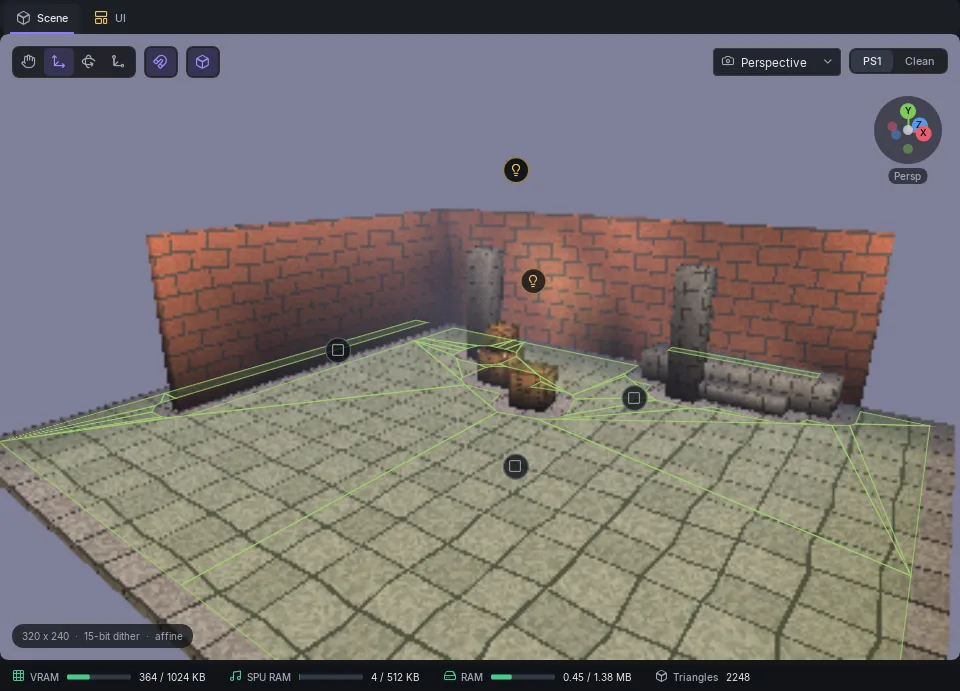
Select nothing, and the scene settings have a Navigation section: the number of regions and portals, and switches for Show in viewport (region outlines), Labels (R0, R1 ... click one to select it) and Portals (the edges the player can cross between regions). Region shows a selected region's floor height and surface.
The Navigation component
A Navigation component bakes walkable ground without a player, or overrides the player's bake: Agent height, Agent radius, Step height, Max slope. If the scene has one, its values win.
Finer bake settings (cell size, region merging) are in the scene file and keep their defaults; see the scene format notes in the editor's repository.
Colliders and triggers
| Component | Does |
|---|---|
| Collider: Static | Walkable and solid scenery. Part of the nav bake. |
| Collider: Dynamic | A box tested against the player every frame. Fires onCollideWithPlayer. Scripts can move it. |
| Trigger box | A volume that calls onTriggerEnter(index) and onTriggerExit(index) on its own script. |
| Interactable | Calls onInteract when the player presses a button within Radius. |
A dynamic collider's box does not turn when you rotate the object.
Rooms and portals
Indoor scenes draw faster if only the rooms the camera can see are drawn. Add Room objects as boxes around areas, and Portal objects on the openings between them.
- Room: Size and Offset are the box in metres. Each static triangle goes to the room whose box holds most of its corners; triangles that fit none go to a catch-all room that is always drawn. The component shows what the last export made of it: triangles, cells and portals.
- Portal: Room A and Room B pick the two rooms (by name, so keep Room names unique) and Width and Height size the opening on the object's X and Y axes. The viewport's arrow points from A into B. From either room, the camera sees into the other through the portal.
The scene settings read Culling: rooms and portals, N rooms once one Room exists; with none it reads Culling: frustum (BVH). The Scene type dropdown is stored but not read by the engine: culling follows the Rooms.
A scene holds at most 31 Rooms. A portal with a missing, duplicated or identical Room names shows what to fix under the component, and the export stops until you do.
Press Build > Room Debug Overlay and then Play to see each room's wireframe in the game.