The Lua Editor
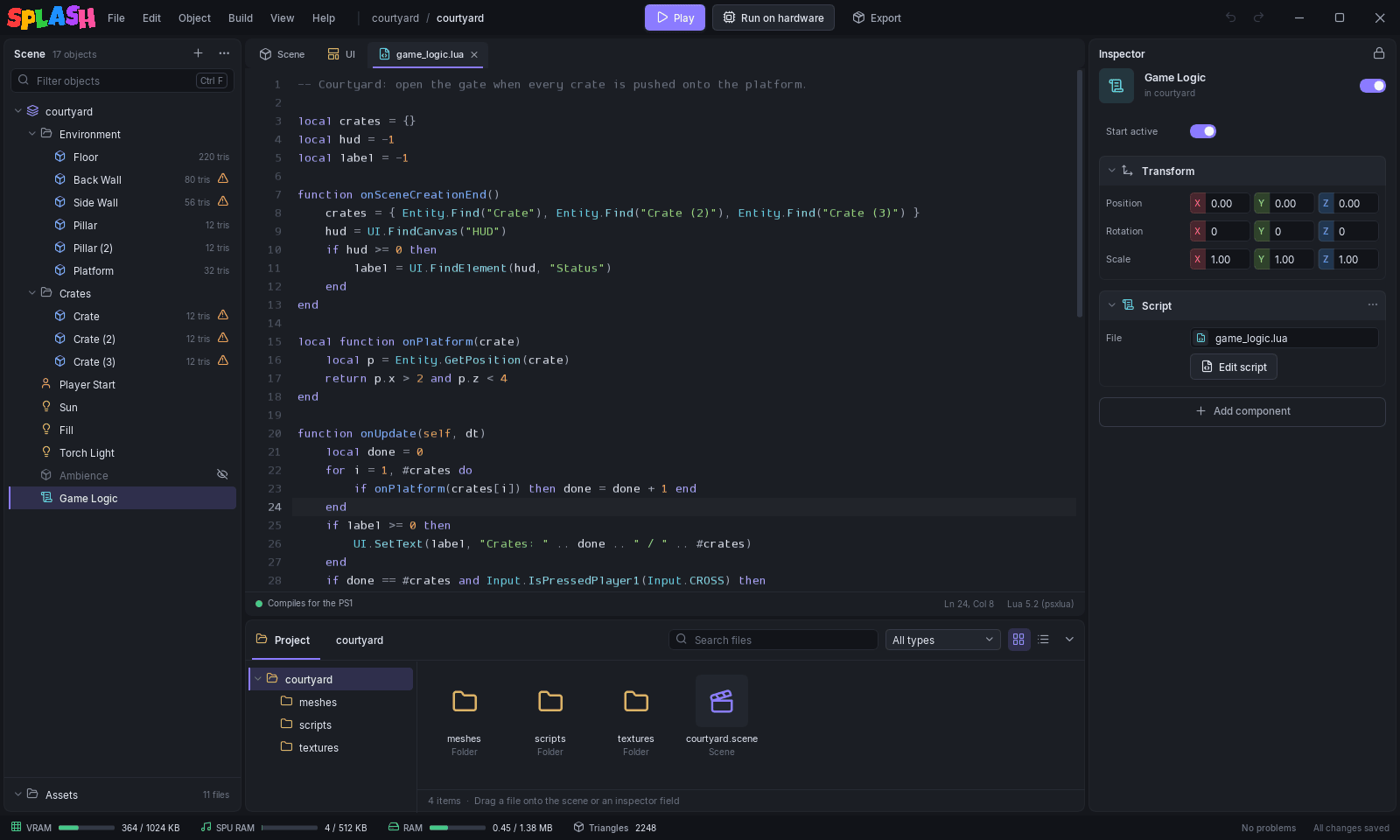
Lua files open in a tab next to Scene and UI. Open one by double-clicking it in the Project panel, or with Edit script on a Script component. New Lua on a Script component writes scripts/<object name>.lua with onCreate ready to fill in and opens it. See Lua scripting for the language and the API.
You can write every script in Lua, build every script from blocks, or mix them in one scene. Neither is the default, and both end up as the same Lua on the console.
What the editor does for you
- Highlighting for Lua 5.2 and the psxsplash API.
- Compile check. A moment after you stop typing, the script is compiled the way the exporter will compile it. The bar at the bottom reads Compiles for the PS1, or shows the first error with its line; click it to jump there, and a squiggle marks the spot.
- Autocomplete. Type
Entity.and the list shows every function in the table, with its signature. Ctrl+Space opens the list on demand. Enter or Tab accepts. Your own functions and variables are listed too. - Signature hints while you type the arguments of a call.
- Go to definition. Ctrl+click a name, or press F12, to jump to where your script defines it. Hovering an API function shows what it does.
- Find and replace. Ctrl+F finds, Ctrl+H replaces. Options: Match case, Whole word, regular expression (with
$1in the replacement) and Preserve case, plus Find in selection. F3 and Shift+F3 step through matches; Ctrl+Alt+Enter replaces all in one undo step. - Ctrl+/ comments the selection. Tab and Shift+Tab indent and outdent.
- Ctrl+S saves; Ctrl+Z and Ctrl+Y undo and redo. The status bar shows the line and column, and
Lua 5.2 (psxlua).
Press Play and open scripts are saved first.
Breakpoints
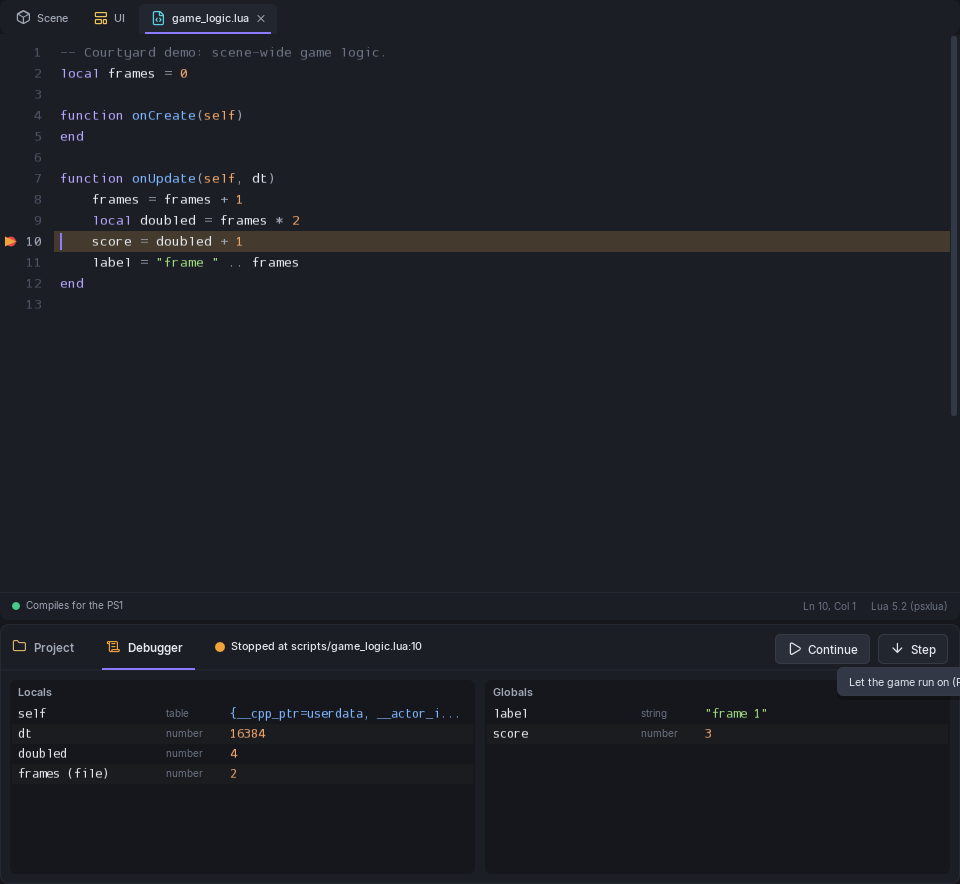
Click in the gutter, left of the line numbers, to set a breakpoint on that line. A red dot marks it; a faint dot shows under the pointer. Click the dot again to clear it. Breakpoints are saved in .breakpoints.json in the project folder. It is hidden from the Project panel and is not part of any scene.
Press Play. When the game reaches a marked line it stops before running it. The script opens at that line, which gets an amber highlight and an arrow, and a Debugger tab appears in the bottom dock. It reads Stopped at the script and line (click it to show the line again) and has two columns:
- Locals: the locals of the function that stopped. File-level locals the function uses are marked
(file). - Globals: the script's own globals. Functions and the engine's API tables (
Entity,Debug,Inputand the rest) are left out.
The tab is there while a one-player Play has an engine with the debugger running. While the game runs, Continue and Step are drawn disabled.
- Continue (F8) lets the game run until the next breakpoint.
- Step (F10) runs to the next line that executes anywhere in Lua. That may be the next line of the same function, or a line in another object's script. Returning from a function that was called from C is not treated specially.
F8 and F10 work wherever the keyboard focus is. A breakpoint you add while the game is stopped takes effect when it resumes.
Debug info only while breakpoints exist
Line numbers and local names roughly double the size of the compiled scripts, and the console loads them into memory along with the code. Play therefore only includes them while the project has at least one breakpoint. If you set your first breakpoint while a Play without any is running, the editor reloads the scene with the debug info and the game then stops there. Disc builds and Export never include it, so they come out the same as before.
Limits
- Only Play stops. Run on hardware does not use breakpoints.
- With 2 to 4 linked players the debugger is off.
- Scripts built from blocks take no breakpoints.
- A breakpoint is a fixed line number. It does not move when you add or remove lines above it, or when you rename or move the script.
- Values are shallow. A table shows its first 6 fields, long strings are cut, and a
FixedPointvalue shows as a table. There is no call stack, no watch list and nothing to expand. - The engine has to have the feature. With an older engine the Debugger tab does not appear and the game runs as before.
Without the editor
The editor drives the engine through two files in the PCdrv folder. luabp.txt holds a generation number on the first line, then one <line> <chunk> per breakpoint, where the chunk is the script's project path. The engine reads it when the scene loads and again every 15 frames. While stopped, the engine prints psxsplash: lua break <id> <line> <chunk> followed by lua local, lua upvalue and lua global lines, then lua break end <id>. Write <id> continue or <id> step to luabp.cmd to resume; a command with a different stop id is ignored. The scripts must have been compiled with debug info.
Files changed outside the editor
If a script changes on disk while it is open (your own text editor, git) and the tab has unsaved edits, the tab says Changed on disk and offers Reload or Keep mine. Ctrl+Z after a reload brings your edits back. A file deleted on disk can be written again with Save.
Closing a tab with unsaved edits asks first: Save, Don't save or Cancel.
Using VS Code or another editor
View > Set up external editor (VS Code) writes two files into the project folder:
psxsplash.d.lua, the psxsplash API as lua-language-server definitions: completion and signatures for every table and function, with hover docs where the API reference has them, made from the same list the editor's autocomplete uses..luarc.json, which sets Lua 5.2 and turns off the libraries the PS1 does not have (math,io,os,require). It is only written when the project has none, so your own settings are kept.
Open the project folder in VS Code with the Lua extension (sumneko) installed. When a newer editor opens the project, it brings psxsplash.d.lua up to date on its own.
Fixed-point numbers
The PS1 has no floating-point unit, so a decimal like 0.5 is not a number in these scripts. Read Fixed-Point Math first. The compile check accepts what the compiler accepts, so it will not flag a script that does the wrong arithmetic.